Showing posts with label Animation. Show all posts

Tuesday, May 16, 2017

End of Days

Nothing Gold Can Stay

But We Should Cherish It Nonetheless


Well, here we are folks.

We've come so far and now I feel as if I stand on the pinnacle, the edge of a very high cliff

A cliff I will soon leap from, but to go forward we must not forget to look back


When I joined e-Communication, it was a leap of faith. Faith in the hope of learning and developing, of meeting people with whom I could share what I love, of finally finding what it was that I was wanting to find for so long: a purpose. Perhaps it sounds cheesy, phrased like that, but it's true. Most of these hopes have accumulated in this final year.

Being here has shown me the true meaning of dedication, the truth behind persistence. Animation as an art form is rarely seen as a hobbyists' fare for it so dramatically absorbs the time and focus of the animator. So many people look at an animated movie, show, or even a short animated GIF and think 'that's not so great, even I could do that!' but they do not understand. Even now I may not understand what it is that I know, and find myself thinking that things will be 'easy' or 'simple' when neither is close to the truth. Discovering what goes into those animations: the hours, the heart, the thought, forces you to appreciate the art at a deeper level than before. You can see under the face value of a feature animated film and have a sense of the scale of what was needed to make it, and no longer wonder why end credits roll for so very long.

When I began here I was quite naive and was one of those who thought it would be simple as it looks, and was hit with a well-deserved reality pie-to-the-face. But rather than, like some, find it disgraceful and painful to face and turn my back on the art and think I'm above it, I take that pie and find it to be so unusually delicious.


So...

What did I learn?

E-communication taught me...

...Technologically, how to use industry-standard software to help take my ideas, from a small yellow bird to an alien robot, and weave into them the illusion of life.

...How to be a leader. I was made to learn, by having to perform, certain leadership methods and challenges. Last year, for example, I helped lead a group to create our stop-motion short: A Beary Bad Day. Not only was it hard to get everyone on the same page, but I found that, to be a leader, one must sacrifice parts of their own desires to keep the group placated.
...How to collaborate with others. In the same project mentioned earlier, I found in some situations, the skills that make a good leader and an effective collaborator are not all that different form each other.

...Communication skills. As in the name of the program itself, e-Communication provides significant experience in communicating with not only your peers, but with mentors and sometimes, even yourself!

...How to manage projects, and by extension, how to manage myself. Many times I have set up a goal for myself had had to leave out parts of projects to compensate for time or ability. With my animation Case File: Luke, I had to remove some of the animation that would have shown his personality for the sake of time. These time management skills will aid me in managing the rest of my life as well.


So,


Who am I now? Because of this experience?

I am Greta. The student who loves to animate. The student who is trying to learn an art more difficult that ever thought.

I am the student who excels at concept. The student that finds meaning in creating what before didn't exist and giving things live, movement, background, form. The student who prides themselves so much on this that too much time is spent thinking and not enough on making.

The student who finds fault in her ability to plan, organize, and set goals within reason. The student who needs to reconcile her hopes with her need to practice and her dreams.

What have I become? I have gone from the girl who worked little but still made the grade to the girl who works hard on her craft with no concern for her grade. I have taken my self-doubt and my fears of insufficiency and meta-morphed them into a butterfly of determination and drive.

I will be the one who takes the lessons learned, lessons of time, of talent, of planning and of effort and will utilize them no matter what changes may arise in my vision for the future.

All in all, I think the past four years have been nothing short of wonderful in this program, and I hope to one day come back and visit, to encourage aspiring artists like myself to never give up.


Tuesday, December 20, 2016

Semester Reveiew

Progress Achieved

Rugger Approaches Completion


Who's This dashing Amphibian?

If you recall my earlier post about my semester project, you'll perhaps recognize the handsome gentleman pictured above. For the first time in a while, I have most nearly completed a project in the amount of time I predicted. (By most nearly I mean there is a scene I have not finished but soon It will be done and this post will be updated) When I get the finishing touches done after winter break, I will have the final product that I intend to submit to eMagine this spring!


I encountered many challenges while finishing this project, but not nearly as many as I encountered in my various 3D projects. Since, when I last left you off, I had created a movie file to help me time my frames, most of the work since then has been drawing the frames and organizing them into workable layers (no need to re-render a background when you can just have the characters move, similar to older 2D levels of animation).


Additionally, I had to make a few sacrifices to the intended product to make the animation more possible. For example, I no longer have Rugger gesture for his drink in the second scene, due to time restrictions. Also, the no longer has freckles on his shoulders, to eliminate possible headaches in the second scene as he pulls himself up on the counter. Shading, as well, has been scrapped so that I can get something view-able rendered in time. It's a bit more than I wanted to sacrifice, but I came into this project simply wanting to get something done, and I did that! I am quite proud of myself for getting this far, and no longer have to wonder if I'll have nothing to show for my years of eComm.


You ready? Take a look below to see for yourself what this final project looks like!


Monday, December 19, 2016

Let's Look At:


Motion Capture Article Review

Acting or Animation?


avatar_sagar


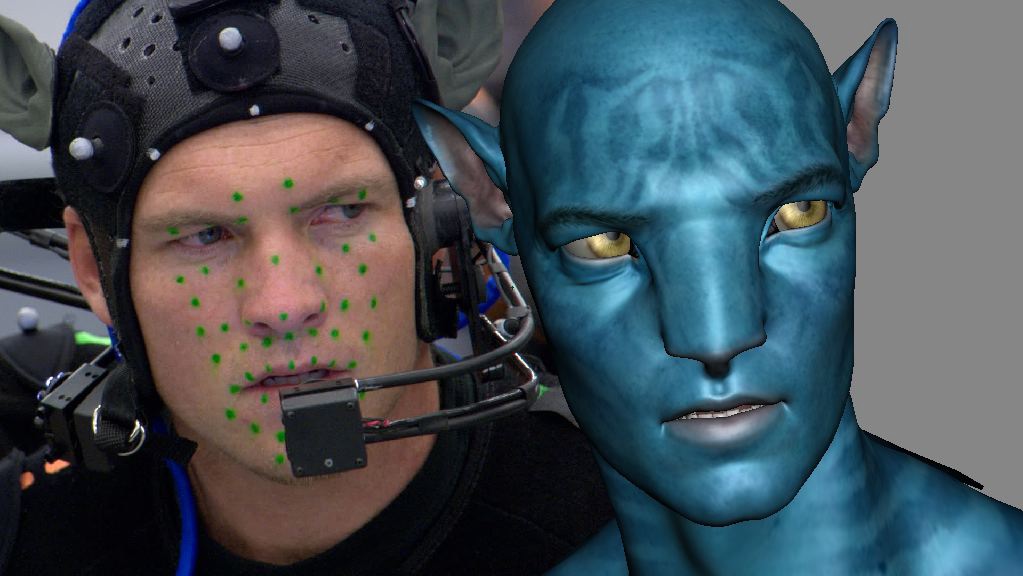
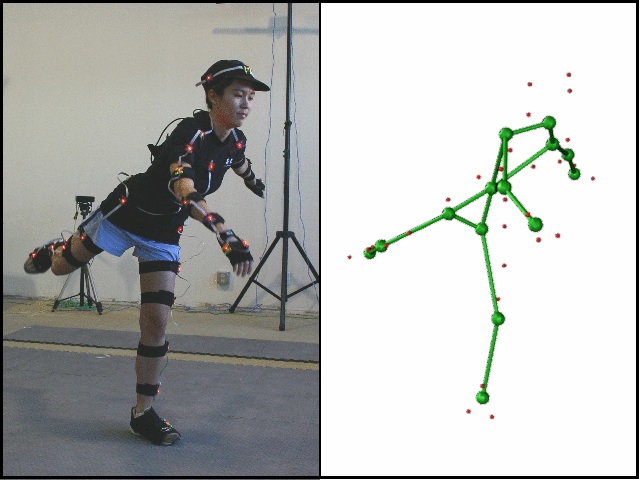
As I was browsing the articles on Animation Arena, I came across a topic that caught my eye: motion capture. More and more movies nowadays are using motion capture to help animate digital characters. From the blue aliens in Avatar to Smaug in The Hobbit, an increased number of characters are made to move to the faces and bodies of the actors that voice them. One side effect of this, however, seems to be the question on whether the main work in on that of the actor or the animator.


Image result for motion capture
The article didn't give a definite answer to this, due to the general lack of one, but it seems that it cannot be defined as either. Without the actor, the character doesn't have the same nuanced performance. Without the animator, the movie would be limited to the special effects incorporated into live action. Motion capture is likely in pinnacle of the symbiosis of acting and animation that exists today.

Beyond it's intense monetary and time-saving benefits, I feel that Motion capture as a medium will only grow in use as the computers we use only increase in computing speed and power to handle what it can offer.

What do you think?

Tuesday, October 11, 2016

Senior Year First Project Hops Into Action!

Going For Gold!

One Frog, One Goal


For our senior year of high school, the scenario is very similar to that of junior year, but with greater expectations. Due to the time-consuming nature of 3D animation, this year, in order to get the the 'animating' part of animation faster, I am attempting a hand drawn animation.

The Frog

If you got past the groan-inducing pun you may have noticed in the title of this post, you may have inferred that the subject of my animation was a frog. This frog is not just any frog, however: this frog is a gun-slinging rough-and-tumble cowboy frog. Our unnamed hero is destined, in this particular animation, to enter a bar of unspecified nomenclature and order a questionably fresh glass of water. It's rather straightforward in nature, but will take considerable effort nonetheless, due to my lack of practice in the realm of 2D movement.

The natural first step to any animation is creating a storyboard. To the left is one of the first scenes from the storyboard I made for this animation, showing him entering the bar. On the right, a later one showing a pose he will take when ordering his drink. It's very important to plan out an animation as in-depth as possible to avoid having to redo parts later on in the process. It also helps plan out camera shots.

While there may not be an actual camera involved in 2D animation nowadays, it is still important to structure each scene dramatically for the greater communicated effect. Since I had not taken part in the video section of the program I am in, this has proven to be an oddly difficult thing for me to puzzle out. For example, the storyboard where he opens the door has a decent camera angle, but doesn't emphasize much about him. On the other hand:

This shot is similar, but uses the looming shadow to make him seem relatively diminutive compared to everybody else, inducing a sense of comedy at the beginning, despite a dramatic set up.
Timing is essential to comedy, so to time it out, I've taken a variety of key poses and put them together in after effects to get a feel for ho the animation will flow upon completion. Timing feels more objective than it should be, but I know that, with practice, I can become very aware of how to create a natural flow of events.


Below is one example of a times out scene. It is extremely rough, but it serves enough to give me a feel for where the frames will need to be.


My goal now is to finish all the rough scenes, then go over them with cleaner lines digitally and, if time allows, to add color to this. I find color just as important as timing in communicating mood, so optimally I will be able achieve a relatively nice-looking animation by the end of second quarter.

Wish me luck!

Thursday, May 19, 2016

Year's End Reflection

It's Been A Good Year

Let's Look Back


Junior year is notorious for being one of struggle and strife, but it can also be one of learning and exploration. From Petri to Ampich-Anne, I have had many chances to look into and develop many new, more complex skills than I had the chance to last year whilst focusing on design and animation. From the trials and tribulations of this bird to the new realm of stop-motion I have been able to learn many things about modeling, project planning, scope, team management, rigging, and much more.


From the very start of this year we had something to do. One project I did not post directly about was a fish. (from the concept art on the left) The goal of this project was to teach us all better modeling techniques, weight painting, and some ways to animate something. It was the springboard for all the modeling and rigging know-how I was to learn throughout the rest of the year. Only now do I truly understand how vital it was that we did this particular project at the beginning of the year.

Looking back upon this fish, I can directly see how it links to what I have been able to accomplish this year. Having to draft the fish initially taught me the advantages and necessity of having an image to go off of. I have repeated this technique with both Petri and Ampich-Anne, as seen in their respective posts Here and Here. Next, we learned vital modeling skills which I have taken to heart with every other 3D project since. We learned a little about UV texturing (probably the least developed skill of mine) and a lot about rigging (Which was then reiterated for me with, yet again, Petri). Each of these skills was learned more though trial and error than direct instruction. Nothing teaches you to plan ahead like having to redo the same steps ten times over due to a lack of forethought. Technically, I feel far more confident in modeling ad rigging than I did before. I feel familiar enough with Maya now as so that I can envision exactly how I intend to pul life out each and every pre-generated shape. (Maybe next year I should practice straying from those...)


A dramatic scene from this year's group project


Beyond those technical skills, this year has given me more vital practice in working with others. All but the stop motion project this year were my solitary ideas and solitary efforts. For me, working with those of differing skills and mindsets is a whole other ballpark of difficulty. Not to say I am introverted to the point where it hides my working: I'm not. Rather, I walk a fine line between wanting everything to go my way and wanting to sit back and watch things unfold. I generally lean towards the fist kind, however, when I have not worked with all the people involved before (and even then my trust only goes so far until I have seen them preform). I feel that this project was the most successful diplomatically for me, as I followed the mantra "If you think you can do it better than the person, you are assigning them to the wrong job". After the cooperative creative process, I was semi-burdened with the task of assigning jobs to people. Many were first picks for certain tasks like set building and model moving, but I often found it difficult to entrust some of the smaller things to others, even if it meant a mountain of extra work for myself. This is something I surely need to work on.


This industry is an industry of people, and it is nearly impossible to go into it without expecting to have to compromise and work with new people along the way. I must find and embrace my strength soon, so I can refine it and combine it with the strengths of others to make a truly skillful work. Last year was a jack of all trades, but really skillful at nothing in particular beyond concept art. That is still something I feel I excel at more than most, and I want to use the skills I have and will gain to be able to both create concepts that can be feasibly executed in these programs and to be able to execute them myself in the way I envision them.


Looking back at all I have done, I don't think I would honestly change anything. Every project messed up, every minute wasted, showed me countless ways that I could improve myself and my project workflow. I was not as productive as I could have been mid-year, but I learned from that, in hindsight, how I could manage my time better. If I had to change something, it would be watching more tutorials before diving into something new. Maybe, if I did that, I wouldn't have to redo as much.

All thing considered, I feel this has been my most beneficial year in e-Communication to date. I have had the rare chance to explore a field that I am interested in pursuing as a career this early in my life. To me, it's best to dip your foot into the ocean of possible careers as soon as possible, as to minimize time wasted pursuing something that you turn out to hate. Maybe that causes me to put too much pressure on my early decisions, but I suppose we'll see how that directs me in the future.

I hope to keep up my posts a little more this summer, but in the meantime, this will be my school-end farewell!


Wednesday, May 11, 2016

Good Golly, Gummies!

STOP!

In the name of stop motion!


Do you know what stop motion is? It's very likely that you have witnessed it whether you know it or not! Films such as The Boxtrolls, Coroline, and The Nightmare Before Christmas are all stop motion productions! What this means is that most if not all of what you are seeing consists of actual, tangible, 3-dimensional models that are moved minutely, frame-by-frame and taken pictures of to create a moving feature film.

It's real, and it's very, very tedious. But it is yet a passion of a small sect of the animation community. This semester our project was to incorporate stop motion into our projects! It was a group project, something I had not done since last year's E.T. clip, but I was surrounded by people I knew and somewhat trusted, and I was confident we could get something together.

The hardest part always seems to be coming to a consensus on the direction of the short. We had ideas involving clothes, living models, and most favorably, candy. The prevailing idea was a short story taking place in a kind of candy land with the stars being gummy bear villagers and a ferocious Bionicle beast. It was not meant to be long, but in hindsight we could have pulled off a longer fight scene to our benefit. After carefully crafting our edible utopia, we set the stage and delegated jobs. Sierra Draney was our intrepid photographer, Jake Combs our monster animating connoisseur, Katelyn Brule our music selector and co-set creator with Sierra and Anna Gaiche, and yours truly as the gummy moving master.

And the best part? This was our winning(ish) entry for eMagine this year! My team and I placed second for animated story!

I hope you enjoy watching it as much as my friends enjoyed eating it!


Tuesday, May 10, 2016

Petri Swallow: Revamped

The Bird Is Back

For the last time, however.


Remember Petri? That yellow bird that gave me so much grief last semester? Well, I revived him! (Mostly by popular demand of my peers, however.) I wanted to make something out of him to prove that I had not spent an entire semester working in vain. (Which it really did feel like I kind of did, in a way.) 

So, I buckled down and made my quasi-rigged bird move for the audience of expectant friends and parents. And, looking at it now, it wasn't as bad as anticipated. Surely not as good I wanted, but ok.

Here it is:


Now, I know it's short and the rigging is not smooth and he never does get his drink, but I think this particular animation is a testament to this past year of animation and my growth in dealing with some particularly horrid issues and incomprehensibly frustrating challenges along the way!

Monday, May 9, 2016

JCCC Technology Challenge

Two Hours of Work, 

Four Seconds of Animation


Hey there! 

It's been a while, I know. And it's been a while since I participated in the event I'm going to talk about, but now is better than never, isn't it? Anyway, let's get right down to it!

A few months back, I had the chance to participate in the Johnson County Community College Technology Challenge as an animator! I was admittedly quite nervous about it, since I had never participated before, and had no clue as to the criteria of the competition. I was very scared that I was going to be out of my league going, but I went nevertheless.

And oh am I glad that I did.

Until that point, I had been relatively unaware that JCCC had an animation program, let alone a rather good one. Kansas, sadly, is not a typical place you'd expect to find good areas to study in that field (But then again, here I am learning this in high school). But despite that assumption I found myself in a beautifully equipped classroom with PCs (I love them, but I hadn't learned to animate on them), tablets, and a second mac monitor. It felt like home, and the teachers that worked there were nice and very helpful, to boot.

The challenge? It was far easier than my fears of character rigging, animating a rock concert, or even having to collaboratively work on it with the people I arrived with, none of whom I knew particularly well. What was it? A logo. 

The JCCC Logo, to be precise. Our job was relatively straightforward: create and animate the JCCC Logo in Maya and create a brief animation displaying it.

This is the logo

We had two hours, and I managed to squeak out four seconds of relatively solid animation from that! (Boy, does modeling suck up time) Here are those precious four seconds:


I placed second overall for the animation category! I feel that if I had been a little less finicky with the text, and had been able to make it more straight, I could have maybe pushed into first place. But, alas, I did not. But at least I lost to a fellow e-Comm classmate!

Friday, March 11, 2016

Let's Look At:

Drawing Practice

Animation-Centered Exercices


Yesterday I was browsing some articles on Animationarena.com, and I came across something I felt the need to share with you all!

Click on the image to visit the article


In Annie Gray's Article, she covered a multitude of exercises that will train the artist to draw with animation, emotion, and dynamics in mind. Gray emphasizes the importance of seeing the details that you don't see normally. Animators need to be able to draw the small details of objects that the human mind disregards in favor of pattern and shape recognition. For example: the human face is a very detailed, complex object. It has wrinkles, creases, flyaway hairs, eyelashes, and all sorts of traits. However, people don't need all this information to understand what they see is a face.

:)

See, you can register that as a smiling face, can't you? It doesn't have eyelashes, a chin, or even a nose. But our mind knows it to be a face anyway. It's this same effect that gray defines as an issue. if you don't take the time to notice all the details, you won't be able to draw them.

I highly recommend taking a look at this article and trying out its exercises if this is a field you want to go in.

But back to my review!

I've seen some of the exercises they recommend before, and tried out one of them myself today: cafe drawing. Sitting in a classroom I observed my fellow classmates as they tested, and picked out certain people to quickly sketch before they shifted poses. Here are some of the sketches:


It was a lot harder than I expected to get a sketch down before the person moved (And to not look like I'm staring)

But just from doing that much I realized the benefits to doing as the article suggests. If you don't practice these skills of detail and movement-oriented art, you won't get good at them.

Gray clearly has a lot of experience refining and developing these kinds of skills, and the article is very well written (even if it is challenging to follow the exercises). I'm sure that I will be using these in the future, will you?

Thursday, March 10, 2016

Tutorial Time

Managing Maya

Forging Feet Fast


Today I am going to impart some of my acquired Maya knowledge with you all! While making my bird petri I found a quick and easy way to make 3D, simple feet that could be adapted for use in birds, reptiles, frogs, or anything in particular!


First off, make the leg. Or the cylinder, if you just want to practice the foot process.

Selecting the bottom faces, extrude the bottom down to the height you want your foot to be. Take the faces you want to be your toes (I removed ended in the middle of the faces to make larger toes) and extrude them all at once. You'll want to make sure 'Keep Faces Together' is deactivated and the you include as many subdivisions as you feel you need. I suggest 6 or more for longer toes.


When you have extended the toes, use the scale tool to shorten the end faces of the toes together BEFORE you exit out of the extrude tool. If you can use the tool to lower the toes to be flat with the ground, great!

However, Maya doesn't always play nice.

If you find that moving up and down sends your toes going in different directions, then here is my quick fix to help you out:

First, select the vertices of the bottom of each toe (together), but not the vertices connecting the toes to the leg (as shown at right).
Going into a side view that works best for you, use the scale tool (Scale Y) to compress all the vertices into a straight line.

After you do that, you can use the move tool and pull them all down to be level with the flat of the foot (or whatever you want them to be level with, if you are going for something different).

As you can see below, it is easy to eyeball it if you zoom in close.


Now, if you go into smooth preview (by selecting the mesh and hitting the "3" key), you can see what you have made! In some animals, there is a toe in the back. To make this toes you just repeat the previous process with the face directly in the back of the front toes. I did this with my foot, as you can see on the right.


Now, the bottom of your foot may still be circular, rectangular, or whatever shape you used. This can be an easy fix!

Taking the opposing vertices along the bottom, just use the scale tool to draw them in together. (In some cases, using soft select in this part will help render a better result in merging into the ankle).


Finally, just tweak the widths of the toes at the beginning, middle and end until you have the kind of toes you are looking for! I only tapered the ends of my toes for this example, but there is so much more you can do!


Thank you so much for taking the time to read or try this tutorial. Being my first attempt at making one, commentary is appreciated! Let me know what I could do better, or what I'm already doing well!

May The Feet Be With You


Tuesday, December 15, 2015

Petri Swallow: Large Project Turned Learning Experience

So what happens when you underestimate a project?

You learn. Fast.


Say hello to Pertri: a small bird with a big problem. We'll get to that problem later. For now, allow me to introduce you officially to the project I have been working on for the past semester. Now, what I expected Petri to become was is far removed from what he ended up being (not to mention that they went though several gender changes and arguments before I finally gave in to calling Petri a 'he' like everyone else did). Here is an overview of what I had expected at the start of the semester:


It started from a simple sketch, a small bird with a broom cleaning alligator's teeth like a dentist-janitor combo. I, having designed the bird to be more or less simple and round, chose Petri to be the star of my first semester animation project.

Little did I know how much work that would turn out to be.


The story went as so: 

Petri flies into work one day to attend to a large clint with a larger problem: there's one tooth that just won't get clean.

Petri tries and tries to clean it, using all sorts of unorthodox methods, but no matter what he does, nothing helps. In the end, in frustration, he ends up accidentally breaking the tooth, bringing about his untimely demise at the hands, er-mouth, of the gator.

I had a storyboard, but the pencil marks were to light and smudged to scan and show you.

So, to the real problem:

Oh wait, not that problem.


This problem:


(You can tell it's the real problem because I made it larger)

This is what happens when you don't construct your rig quite right
The name of this problem? Rigging. For those of you who don't know or are unfamiliar with rigging: rigging is the placement of bones in an animated character to make animation easier and to define character movement. In essence, constructing their skeleton, as you can see above. 

Now you may be thinking: "But Greta, that looks like a fine and dandy skillet rig you've got going there, what's the problem?" But my friend, I must tell you this is the finished, refined rig of the bird. While it doesn't look much different from the initial setup, it is far better at what is was built to do that version 1.0. 


To get to this stage of superior rigging, I went through modeling, rigging, assigning bones to joints, beginning animation, and then undoing all my work until I was back at square two: rigging. Because of this, I have no true finished "animation", but the amount I have learned from the project makes all the struggle and turmoil and headaches worth it. For example: The prop and scenery work shown below from what I had anticipated to be part of the final work.


The most valuable skill I gained from this is the proper, or at least more efficient, way to rig a character in Maya. IK rigging is a kind of rigging shortcut that takes where you want a certain joint to be, and moves all subsequent joints in a way that will get it there. It takes longer to set up, but makes the actual animating a whole world easier.

So, in summary, will I be putting forth more effort to get something done right next semester?

Yup. I want to be able to get something completed this time.

Will I grossly underestimate the scope of a project?

I hope not. I need to take careful consideration of what difficulties the next project will have.

Will I be using IK rigging the first time?

Oh yes. It's a very handy tool and I hope to perfect my work on it.

Will you all be seeing more of me and my work next year?

You bet! I want to be more active on this blog, so I may also post some non-animation art ventures to keep this place a tad more lively!

Remember, if you have anything to say leave it in the comments! I like to get feedback and hear what you all think!

Friday, October 9, 2015

Acting in Animation

Acting? What does that have to do with Animation?

More than you'd expect, it seems


Today I took a look at Doron A. Meir's article on acting and animation. While the title intrigued me, the content did more so. In his article, Meir covers what it really means to bring a character to life in animation. He doesn't just mean the story or even the design, but the movement of a character in itself, whether you were the one directing the story or just working off a given script, Meir stresses the importance of acting.

Meir claims that modern animations have come to lack the higher quality of acting in their animation as seen in older works. He sees the characters as well modeled, but poorly developed and poorly acted. He sees the character move, but he can no longer feel them working as an individual character. Meir's definition of acting requires that the animator can think, feel, react, and retain the consistency of the character in a way that makes the audience believe that the character is a real, living, breathing (where applicable), thinking individual: a practice that is much harder than you may think.

While Meir may have a good point, they provide little to no evidence to support their claims on neither the loss of acting nor any way to bring it back to the spotlight. Meir gives us no clear examples of a poorly acted and well-acted character in any more detail than a name. This, unfortunately, detracts from their interesting argument a little, giving us no more than some textbook terms on how to feel, react, and set the mood.

Despite the detraction from his validity, Meir does bring up an interesting point, whether or not this is becoming less prevalent: how to do more than make a character move. What Meir misses in the things he sees are the extra thoughts and effort to truly develop a character. Sometimes I can see what he means by it, too. I need to be sure to, with my own characters, bring to life their personalities and make them empathize-able on-screen to the viewers.


See the article yourself at:

http://www.animationarena.com/acting-and-animation.html


Friday, September 4, 2015

Let's Take A Look

Big Buck Bunny:

Professional Project Review


Today I'm going to talk about something I didn't make: a wonderfully made short film by the folks who developed the software Blender. Big Buck Bunny (2008) was made to showcase the capacity their free product could create with.

Big Buck Bunny tells the story of a large, gentle bunny that is endlessly tormented by squirrels. One day he decides to rebel and strike back against the squirrels with crafty traps. The short film is well put together, with a 3D modeled environment and characters that are accented with the excellent lighting. While most of the camera shots are close, the people at Blender still manage to establish a deceptively calm, pretty meow setting to contrast the actions of the squirrels. The short film sets up many similar contrasts such as:

-The bunny is oddly large and relatively masculine, but still acts dainty at the beginning
-The squirrels appear small and cute at the beginning, but slowly are revealed to be menaces
-The setting is serene and there are beautiful butterflies, but they are crushed by squirrels

If I were to take something away from this piece to apply to my own work, it would be creative use of camera angles and lighting. Since there is no dialogue, they communicated the story through gestures, faces, and angles. I am quite a ways away from that level of camera angle usage. One thing I saw that I can do, however, is the lighting. While I by no means can accomplish the lighting they have, I can identify possible ways they accomplished theirs. 

The only thing I could bring myself to critique is the grass texture, which at times seemed off, but even that wasn't detrimental to the film as a whole.

If I were given the task of improving it, I would probably look into developing the squirrels motives a teeny bit, but that'd be it. 

All in all, This short film is a funny, well-timed work that is definitely worth giving a watch if you like humorous story lines and comedic characters.

Tuesday, May 19, 2015

E.T. - Extra Technological

THE HOME STRETCH:

Robot Meets Life Meets Cumulative Final Project


Meet Robo: A rising star in the student movie clip industry. While he may not appear to be much, it was our task to give him his premier debut.

Well, maybe that wasn't exactly the outline of the project, but it's pretty close. Our real assignment was to apply all that we have learned into a group project. These new skills we aimed to apply were skills like 3D modeling, lighting, using a green screen, and special effects. My team: Jessica Love, Jessie Blom, and myself. With our combined powers, we got down to business.


To start off, we dove into the essence of the plot: the storyboard. Since storyboarding is something I particularly like to do, I took charge and scribbled our cheesy ideas down. (Now, I know my art can be better than this, but we didn't want to spend so much time on this) We came up with the idea of parodying that one scene from E.T., but with a robot on another planet. Robots: what could possibly go wrong? (Maya, that's what, but more about that later)

We went though a few hardcore rounds of 'nose-goes' and Jessica came out as our actor. So, while my comrades trekked down to the green screen studio, I stayed behind as our resident "Maya Master". For those unfamiliar, Autodesk Maya is a  3D modeling program, and the one we happened to have in the classroom. It's not a bad program, but it does have it's quirks. Some of those quirks, I've found, can be rather, or more accurately, extremely frustrating. But we'll get to that story.


Looks OK now, but...
I had an absolute blast modeling our resident star in Maya. Being a robot, he was easily composed of inorganic shapes which are much easier to make in maya than say, a hand. The special touch I added this time was parenting. 

Parenting, beyond the maternal and paternal varieties, is the act of taking one shape, and sticking it to another shape. This means that, if I move the parent shape, all child shapes below it will move, but not any shapes that the parent is parented. it's like a big tree, branches of children extending from the one, mighty parent at the bottom. If that shape moves, all the rest follow. This was crucial to having our robot move since who would want a robot whose elbow didn't move with it's shoulder? or its torso? No one, that's who. I put my heart and soul into perfecting our co-star.


Look at this absolute mess

The final trial on the modeling before animation was the wrists. (You can see they don't move in the final product) 

This was a rather blunt showcase of one of maya's specialties: Screwing up the simple stuff. I mean, just look at what it did to poor Pasted_cylinder_RWrist. 

Complete disaster. 

But, nevertheless, I persevered and came out with our amazing robot: Robo. A few shiny textures later and we were on the fast track.


ROBO in his completed glory


On the flip side of our team, we'd gathered our green screen shots together to key them out. By 'key out', I mean remove that bright green color from the background and replace with with something cool.

After compiling our efforts, we added the nifty sounds of Celldweller's The Wings of Icarus and Viola, we had our project. (It's a cool track, I'd listen to the whole thing if the clip interests you, it's interesting music for sure)


This project, overall, has taught me some of the more in depth abilities of Maya. I learned how to apply my knowledge of shapes, Booleans, parenting, and even aligning to make the robot reach it's highest degree of excellence. Outside of my new-found technical prowess, We, as a team, also gained more experience in team synergy and division of labor. (This is something I need more practice in for sure)

For future projects, I feel that I'd like to keep with the group dynamic we had for this one, but with more communication. I felt it may have been smart to check each other more often so that we are all and the same track. I also feel that, as we all improve in our chosen tracks, that we'll find even more smooth and easy teamwork styles to use. I await being able to work with the people I have seen in the future. And without further ado: our project:


Wednesday, May 13, 2015

One Screen Two Screen, Red Screen Blue Screen! (Don't Forget Green Screen)

Throughout the history of film, many artists have discovered different ways to "key out" or make a matte in their films:

Today, with the common use of the green screen, it it always a little interesting to 

see where the technique originated from.


The Magician's Medium:

Q: What was the magician's medium and how did it work?


We can all thank this Melies guy for going through
this process in the name of ART.
(And illusions. Mostly illusions)

A: The magician's medium was one of the first matting techniques used in film, 
allowing the filmmakers to expose certain parts of the film at a time and 
expose each to a new image separately upon re-filming. This was achieved 
with the use of black paint on each separate square of film. Other methods 
using painting included the tactic of painting over a pane of glass in front 
of the camera to create the fake scenery. While long and monotonous, this 
process was one of the first steps towards the fancy green
screen technologies we all know today in our weather forecasts and movies.
(Or even movies about weather forecasts, if that strikes your fancy)


Q: If they couldn't use green screens in black and white films, what did they use?


A: Black screens! Since the black and white films didn't have to worry
 about colors and the subtle contrasts involved with those, they could rely
 solely on lightness contrast to key out their subjects. The dark black of
 the screen would easily contrast with any lighter colors on there parson or
 object involved  making for a much more efficient method than 
painting over frames one by one!


Q: Did they only use black screens in Back and white films?


A: No, in fact, they began using the blue screen, or Dunning Process, in 
black and white films around the time when the mighty King Kong arrived on
 the big screens. Similar to the black screen, the blue screen helped create 
contrast in the subject, but instead of simply laying out black and white 
contrast, they brought out the differences between blue and yellow. However,
this technique would not be transferable to color film since to gain the correct 
contrast, the actors were lit in a bright yellow light.


Q: What did they do when they switched to color?


A: Well, this was not the case for any company but Disney, but the 
Yellow screen (Developed by Vlahos in the 50's) came into use in the films 
The Parent Trap, Marry Poppins, and more. With similar techniques to that of 
the previous screens, the Yellow screen was keyed out with a special 
prism camera. 
(Owned exclusively by Disney, of course)
This method was used by Disney for 40 years.

Q: What about everyone else? 


A: They used the Blue screen to chroma key their subjects out!


As shown by the graphic above, it took a lot of keying to get the subject 
out from a blue screen, but without the use of Disney's exclusive yellow 
screen and prism camera, they had to make do.

Q: So, if they had that, why do we only hear about green screens today?


A: Well, green screens came into use due to their cheaper nature, greater
obscurity in most outfits, and they've even made cameras that are more
sensitive to the green light. That doesn't mean the other colors have 
fallen into oblivion, however. The blues and yellows are still used today for
various needs and purposes.

(Information gathered from here)

Tuesday, April 21, 2015

e-MAGINE the Festivities

Greetings readers!


That's me on the left there. My friend Katelyn is on the right.

As you may or may not be aware, my high school Olathe northwest, hosts an annual digital media festival so gallantly named e-MAGINE.

Schools all across the Kansas-Missouri area converge on my home turf to display their digital proficiencies in animation, graphics design, video, and web design! With categories spreading from advertisements to 3D organic modeling, there was a place for everyone to show off their skills! To see what I mean, you can check out all of the entries here.

My Personal Entry:


Of course, there's no way that I wouldn't have submitted something to this event (especially given that I was required to attend regardless of participation), and I took a week of my like to animate one of the most bizarre character designs I have in my arsenal: Jeffely. (Whom you can search to see more of at my Deviant Art)

Now, Jeffely may not make any sense physically, but I can assure you that he's a full-fledged character with a fleshed-out personality (even if you can't see it from this simple loop animation) and I adore drawing him doing all sorts of things.

This perfect loop may have been seamless and well put together, but I only got into the top 5, and did not formally place, for I had not given the image any of his personality or story. But since I had not tried for any, I was not surprised. (At least I got on the slideshow this year)

Here's My Entry:


NEXT YEAR I plan to enter something amazing, something that contains sweat, blood, and passion poured into it over an extended time. I will strive to make a STORY. (And maybe even beat McCall)

So anticipate the best when it comes time to enter again! Wish me luck!